Looking for a smart fan speed controller to automate your ceiling fans? This guide highlights top options that work with major ecosystems like Alexa, Google Assistant, and Apple HomeKit. Each product is chosen for different setups—single-pole installs, multi-device control, and hub-based ecosystems. Ideal buyers include tech-savvy homeowners, those wanting voice control, and renters seeking easy installation without rewiring. Below is a quick summary table of the selected products to help you compare at a glance.
| Product | Best For | Key Benefit | Notes |
|---|---|---|---|
| Leviton Decora Smart Fan Speed Controller, 2nd Gen | Smart homes with Leviton ecosystem | Quiet 4-speed control with schedules | Neutral wire required |
| Kasa KS240 | Apple HomeKit users | 4 speeds and adjustable brightness | 2.4GHz Wi‑Fi only |
| Lutron Caseta PD-FSQN-WH | Caseta-heavy setups | Strong compatibility with multiple hubs | Hub required for full features |
| TREATLIFE Smart Fan Switch | Budget-friendly, neutral-wire installs | 4 speeds, voice control via Alexa/Google | Not for 3-way circuits |
| Enbrighten Z-Wave Plus Fan Control | Z-Wave smart homes | Dedicated fan speed control with Z‑Wave | Hub required, not for lighting |
Leviton Decora Smart Fan Speed Controller, 2nd Gen

The Leviton D24SF-1RW offers four quiet fan speeds (low, medium, high, max) and integrates with Leviton’s smart ecosystem as well as Alexa, Google Assistant, and Apple Home/Siri. It suits buyers who want an in-wall solution that replaces a traditional on/off switch and supports scheduling and auto-shutoff timers. Best for homeowners who prioritize Leviton compatibility and reliable voice control. A potential limitation is the requirement for a neutral wire, which may affect older wiring.
Kasa Smart Ceiling Fan Control KS240

The KS240 provides four fan speeds plus light dimming, with control through Apple HomeKit, Amazon Alexa, and Google Assistant. It’s ideal for users who want integrated lighting and fan control in one device and who operate within a 2.4GHz Wi‑Fi network. Choose this if you’re already in the Apple ecosystem or want direct HomeKit compatibility. Note that it requires neutral wiring and is designed for single-pole installations.
Lutron Caseta Smart Fan Speed Control Switch

The Caseta PD-FSQN-WH switch provides four fan speeds plus off and works with a range of hubs for expanded compatibility. This option is best for homes already using Caseta or those who want robust wireless control and integration with other smart devices like Ring or Sonos after adding a Caseta Hub. A limitation is that full features typically require hub setup, and some users may need the Fan Pico remote for remote control, which is sold separately.
TREATLIFE Smart Fan Switch
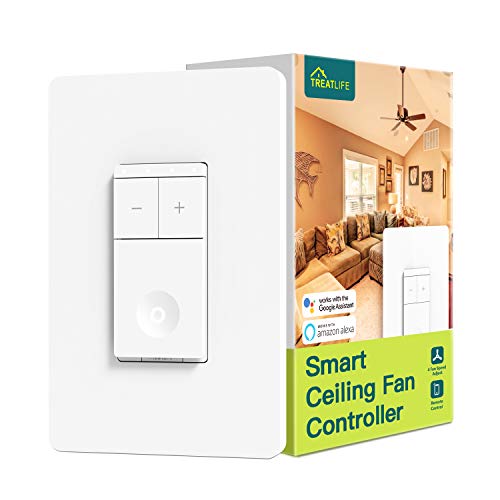
The TREATLIFE switch is a budget-friendly 4-speed option needing a neutral wire, and it supports 2.4GHz Wi-Fi with Alexa and Google Assistant. Best for single-pole ceiling fans in neutral-wire-enabled homes. It does not support 3-way configurations or lighting control, so avoid this if you need multi-location control or integrated lighting.
Enbrighten Z-Wave Plus Fan Control
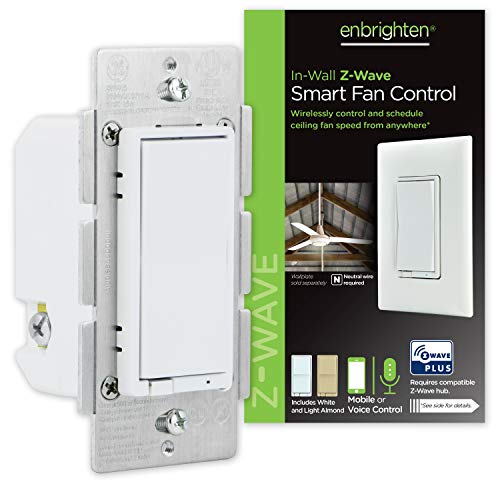
This Z-Wave Plus fan control is designed for Z-Wave hubs and supports up to two fans from a single switch with speed adjustments (high, medium, low, off). It’s best for homes with a dedicated Z-Wave hub and users who want a dedicated fan control that integrates into scenes and automations. It cannot control lighting on most fan installs, limiting its use if you need combined fan and light control.
Leviton Decora Smart Fan Speed Controller, Z-Wave Plus

The Z-Wave Plus version adds SmartStart enrollment and secure voice control through a compatible hub. Best for users who want robust Z-Wave connectivity and a familiar Leviton design. It supports speed control via hub apps or voice through a Z-Wave ecosystem. Note that operation relies on a Z-Wave hub, which may add setup steps for some buyers.
Meross Smart Ceiling Fan Control & Dimmer

The Meross device combines fan speed control with a dimmable light switch, offering 3 or 4 speed settings and HomeKit, Alexa, Google, and SmartThings support. It requires a neutral wire and is compatible with 2.4GHz networks. Best for buyers who want a single device to handle both fan and light in Apple-centric homes. It notes that it does not reverse fan rotation and requires compatibility checks for fan wiring.
Universal Smart WiFi Ceiling Fan Remote Kit

This kit provides remote on/off control for ceiling fans via 2.4G Wi-Fi without dimming. It supports Alexa, Google Assistant, and the Smart Life app. Best for renters or installations where a simple remote is preferred and dimming is not required. Limitations include no dimming function and potential compatibility considerations with certain fan models.
Buying Guide: Key Purchase Considerations
- Compatibility: Check your hub ecosystem (Alexa, Google Home, Apple HomeKit, Z-Wave, Zigbee). Some products require hubs for advanced features.
- Wiring: Many devices require a neutral wire. Verify your wiring before choosing a model.
- Single-Pole vs. Multi-Way: Some controls work only for single-pole installations; others support 3-way configurations.
- Dimming vs. Speed: Decide if you need light dimming in addition to fan speed control, or strictly fan speed.
- Latency and Scheduling: If you rely on schedules, ensure the device supports timers and scenes without noticeable delays.
- Voltage and Load: Confirm your fan’s current draw matches the switch’s rated load to avoid overheating or tripping.
Frequently Asked Questions
Do I need a hub for these smart fan controllers?
Many controllers work directly with voice assistants, but some require a hub for full feature sets or multi-device control. Check the product’s hub requirements.
Can I replace any ceiling fan switch with a smart controller?
Replacement is typically possible if the wall box has neutral wiring and supports the device’s wiring scheme. Some fans with built-in remotes or DC motors may not be compatible.
Will these control lights and fans at the same time?
Some models offer both fan speed and light dimming, while others focus solely on fan control. Verify the device’s capabilities before purchase.
Is a 3-way configuration supported?
Several options support 3-way setups, but compatibility varies by brand. If you need 3-way control, confirm model support and any required accessories.
What about voice control reliability?
Voice control reliability depends on your hub, Wi‑Fi network, and device compatibility. Ensure robust Wi‑Fi coverage and hub configuration for best results.
Are there safety considerations when installing?
Follow electrical safety practices and, if unsure, consult a licensed electrician. Ensure units are installed in a standard single‑pole wall box with appropriate wiring.