Looking for a reliable adapter to make a mini-split or ductless AC smarter? This guide highlights top mini split control adapters that work with Wi‑Fi, voice assistants, and automations. Each selection is suited for different buyers—from tech enthusiasts who want full app control to homeowners seeking simple, budget-friendly upgrades. Read on to compare devices, what they do best, and who should choose each option. The following picks concentrate on easy setup, broad compatibility, and practical automation features.
| Product | Best For | Why It Stands Out |
|---|---|---|
| Breez Lite | Smart home integrators and Android/iOS users | Broad compatibility with 20,000+ models; no subscription; supports Alexa, Google, Siri, SmartThings, IFTTT |
| Mitsubishi Wireless Interface 2 | Owners of Mitsubishi mini-splits | Official Kumo Cloud integration; local and remote control via app; works with Alexa & Google |
| SmartKit WiFi USB Adapter OSK105 | Budget-friendly, easy setup | USB WiFi dongle for compatible mini splits; simple installation; Smart Kit identification |
| WOOX Smart Controller | IR-based smart retrofit for multiple units | Turns non-smart units into smart devices; temp/humidity monitoring; geo-fencing |
| Breez Eco | Value-conscious smart control with robust features | IR remote control replica; schedules, geofencing, local control; no subscription |
Breez Lite Smart AC Controller

The Breez Lite is designed to make almost any ductless AC smart. It supports iOS and Android apps, works with voice assistants, and does not require a subscription. Best for buyers who want broad compatibility with many mini-split models and a straightforward setup. It detects remotes automatically and includes guidance for optimal placement (6–12 feet, line of sight).
Best for: home owners who want flexible voice control (Alexa, Google, Siri), SmartThings, or IFTTT integration without ongoing fees. Limitations include the need for line-of-sight positioning for best response and a one-minute setup expectation.
Mitsubishi Electric PAC-USWHS002-WF-2, Wireless Interface

The Wireless Interface 2 offers complete control for Mitsubishi mini-split systems via Kumos cloud, enabling remote and local management. It is designed to work alongside MHK1 and can be controlled through the mobile app or web browser. Best for Mitsubishi unit owners who want native cloud-based control and compatibility with Alexa or Google Assistant.
Best for: Mitsubishi owners who need seamless cloud control and local access. Caution: requires compatible indoor units (SEZ, SVZ, SLZ, MVZ, P-Series, or City Multi) to power both devices, and it may involve more complex setup than basic adapters.
SmartKit WiFi USB Adapter OSK105
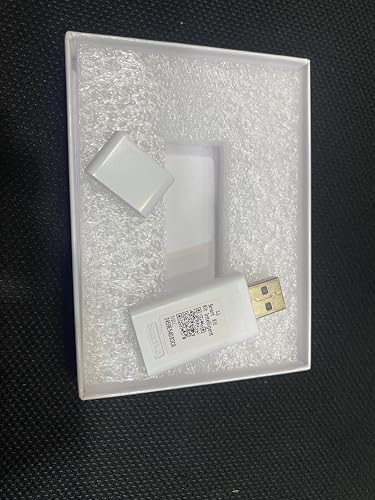
The OSK105 is a USB WiFi adapter that enables wireless communication for compatible mini split systems. Its plug-and-play approach aims to be quick and hassle-free, with a unique MAC address for easy home network pairing. Best for buyers seeking an affordable, simple way to add Wi‑Fi control without complex wiring.
Best for: budget-conscious installers who want a quick upgrade without altering the AC’s wiring. Caution: effectiveness depends on model compatibility and the USB port availability on the unit.
WOOX Smart Air Conditioner & Heater Pump Controller
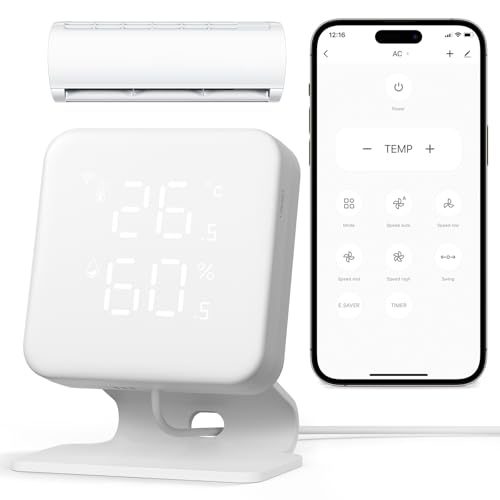
The WOOX controller converts non-smart mini splits, window units, and portable ACs into smart devices. It features temperature and humidity monitoring, plus geo-fencing and seven-day programming. Best for households with multiple legacy units seeking centralized smart control and automation.
Best for: users wanting real-time T&H data and location-based automations. Caution: some users may experience setup variations depending on IR compatibility and device range.
Breez Eco Smart AC Controller

The Breez Eco uses IR control with Wi-Fi connectivity to manage mini splits, window, and portable ACs. It supports weekly schedules, geofencing, and remote operation via iOS, Android, or web. Best for buyers who want strong scheduling and location-based control without a subscription. It also includes a local power button for offline use.
Best for: value-driven buyers who need reliable scheduling and geofencing. Caution: some advanced features rely on cloud connectivity, so offline control may be limited if Wi-Fi drops.
Buying Guide: Key Considerations For Mini Split Adapters
- Compatibility: Check whether the adapter supports your exact mini-split model, window unit, or portable AC. Some adapters are brand-specific, others are universal with broad model compatibility.
- Connectivity: Decide between Wi‑Fi only or multi-protocol control (Alexa, Google Assistant, SmartThings, IFTTT). Consider whether you need local control if the internet is down.
- Ease of installation: Look for plug-and-play USB adapters or devices that auto-detect remotes. Avoid systems requiring extensive rewiring unless you’re comfortable with installation.
- Automation features: Schedules, geofencing, and remote control can save energy. Evaluate how robust the app interface is and how data is presented (history, usage trends).
- Security and privacy: Ensure the adapter uses secure connections and provide straightforward ways to manage access for household members and guests.
- Physical placement: Many devices require line-of-sight to the remote or sensor accuracy can depend on distance (typical sweet spot: 6–12 feet).
- Reliability and updates: Prefer adapters with regular firmware updates and responsive support to keep compatibility with evolving smart home ecosystems.
Frequently Asked Questions
- What is a mini split control adapter? A device that enables remote and automated control of ductless mini-split systems via Wi‑Fi or smart home ecosystems.
- Do I need a subscription to use these adapters? Most options shown here offer free apps and do not require ongoing fees.
- Can I control multiple units with one adapter? Some adapters support multiple devices or can be paired with other smart hubs; verify compatibility for your setup.
- Is line-of-sight important? For IR-based controllers, line-of-sight improves reliability; many use app control in parallel to IR commands.
- Will these work with any smart home assistant? Many support Alexa and Google Assistant; some add Siri Shortcuts or SmartThings compatibility.
- What if my unit isn’t listed as compatible? Look for universal IR-based controllers or consider a brand-specific adapter like Mitsubishi’s interface if you own a Mitsubishi unit.